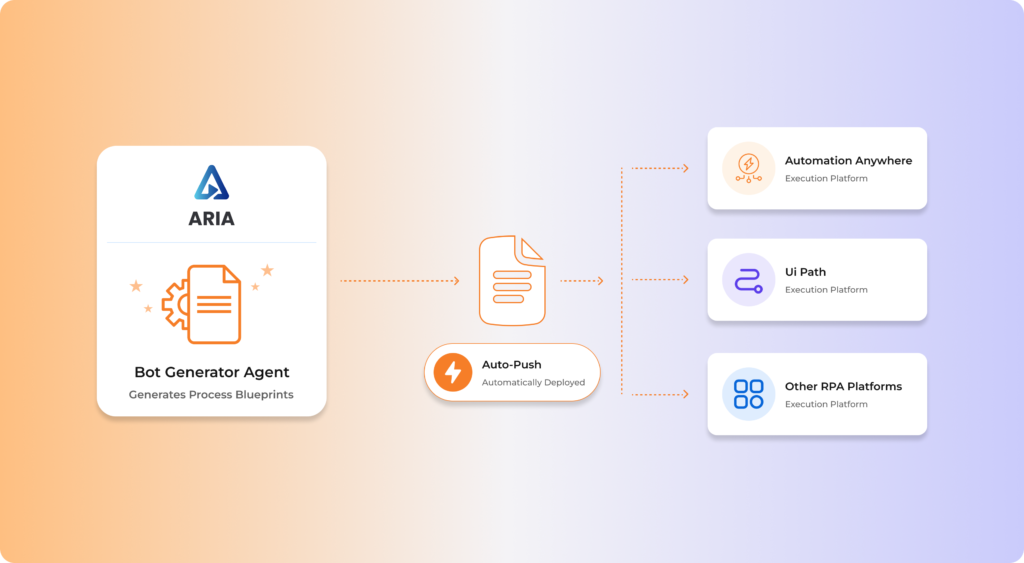
We're not tied to a vendor.
Neither should you be.
ARIA and AURA don't care which RPA tool you bought. They run across UiPath, Automation Anywhere, Blue Prism and Power Automate, and they monitor every system, protocol and identity provider your automations touch, including the ones nobody at your company controls.
What we support
AutomationCOE was built on one deliberate architectural decision: the agents are platform neutral. ARIA generates documentation from a process recording no matter which RPA tool ends up building the bot. AURA monitors a dependency no matter who owns the system.
That matters because almost nobody has a single-vendor estate. What you have is ten years of accumulated decisions. Several RPA tools, a couple of ERPs, an identity provider halfway through a migration, and a mainframe everyone agrees should be replaced eventually. Every bot you deploy leans on systems you don't fully control.
So the support model is dependency-first rather than vendor-first. If your automation depends on it, AURA watches it. Right now that's 3,000+ automations, across 60+ enterprise clients and 12 industries.
CHALLENGES ADDRESSED
- Estates fragmented across several RPA vendors with no monitoring layer common to all of them
- Tools that watch the bot but not the systems the bot depends on, which is where the failure actually starts
- Vendor lock-in that makes even evaluating consolidation too expensive to bother with
- No single view of what breaks when a given system goes down
How AutomationCOE Delivers Strategy
Automation COE replaces assumption-based strategy with evidence-driven roadmapping — using ARIA to surface the real picture of your automation opportunity landscape.
Estate discovery
Every RPA platform, enterprise system, interface and identity provider in scope gets inventoried and mapped.
Dependency graph
AURA builds the graph linking each automation to everything it relies on, including systems outside your control.
Integration design
Connection method, authentication path and failure mode, defined system by system.
ARIA platform alignment
ARIA is configured to generate documentation and test artefacts in your platform's native conventions.
AURA instrumentation
Monitoring, thresholds and alerting configured across every registered dependency.
Residency and access
Data residency, access patterns and audit controls set to whatever your regulator actually requires.
Key Capabilities
Multi-platform RPA coverage
One COE standard across a mixed estate, without forcing a consolidation that doesn't make commercial sense yet.
- UiPath, Automation Anywhere, Blue Prism, Power Automate
- Platform-native artefact generation through ARIA
- Cross-platform monitoring in one AURA view
- Vendor-neutral migration and consolidation modelling
Dependency-aware monitoring
AURA watches what automations depend on, not just the automations themselves.
- Full dependency graph across the estate
- Upstream drift and contract change detection
- Blast radius view for any system outage
- Predictive alerting before business impact
Enterprise system integration
Connections into the systems that actually run the business, including the ones nobody wants to touch.
- ERP, MES, CRM, ITSM and HCM integration
- Mainframe and legacy interface support
- API, queue, file and screen-level connection
- Custom and in-house applications
Deployment and residency
Deployed wherever your regulator, your security team and your architecture require.
- On-premise, cloud, hybrid and air-gapped
- Data residency configured per market
- Aligned to ISO 9001:2015 and ISO 20000-1:2018
- Validated environment support for GxP
Business Value
Platform neutrality isn't really a feature. It's what stops your automation programme being priced by your RPA vendor.
Automations monitored
Live across 60+ enterprise clients and 12 industries, on whatever platform mix each estate arrived with.
RPA platforms supported natively
UiPath, Automation Anywhere, Blue Prism and Power Automate, under one standard and one monitoring view.
Fewer production incidents
Dependency-aware monitoring catches the upstream change before it reaches the bot, and the bot before it reaches the business.
Vendor lock-in
ARIA and AURA are platform neutral, so consolidation stays a commercial decision rather than a technical hostage situation.
Where this applies
Multi-market, multi-platform estates
Automation inherited through acquisitions and market expansion, running on several RPA tools with nothing common underneath.
ERP and MES integration
SAP, Oracle and Infor environments bridged to MES, quality and supply chain systems, with every interface registered as a monitored dependency.
90+ entity shared services
One dependency graph across every entity, so a system outage produces one known blast radius rather than ninety separate investigations.
Validated and air-gapped environments
Deployment inside GxP-validated and network-isolated environments, with residency and access patterns matched market by market.
Customer results
Global Financial Services Group
Automation fragmented across 4 business units running 6 different RPA tools, no central governance, and quality visibly declining.
Unified CoE in 90 days, monitored in one AURA view, without forcing a platform consolidation first. Automation failure rate down 60% within 12 months.
Global shared services, 90+ entities
No dependency visibility between entities, so every upstream change produced an unpredictable set of silent bot failures.
Full dependency graph registered under AURA. 412 production incidents prevented in 90 days. 99% uptime, MTTR down 71%.
Related reading
Why Automation programs Stall in the First Six Weeks